# View Binding 大致原理简易分析
# View Binding 大致原理简易分析
## 1. 简易介绍
ViewBinding 是 Android 中的一种视图绑定的工具,可以给 layout xml 动态创建属于它的 Layout Binding Class,不过我们应该关注一下这个东西是怎么实现的,我们要分为编译前和编译后:
- 编译前:
1. KAE: 分析 XML 文件,通过 IDE 插件(Kotlin) SyntheticResolveExtension 创建 Synthetic 语句(替换为 findViewById)
2. ViewBinding: 分析 XML 文件,通过 IDE 插件(Android) shortNamesCache,customUsageSearcher,resolveScopeEnlarger 等来实现实时创建 Layout Binding Class
- 编译后:
1. KAE: 通过 kotlin compiler plugin,修改 JVM ByteCode/IR,编织入类似 findViewById 这种代码,本质上和 kotlin data class 的 copy 方法的实现原理是类似的
2. ViewBinding: 生成 Binding 类,并于项目中其他代码一同参与编译
所以其实 ViewBinding 是要比 KAE 更加低效的,当然肯定都不如直接写 findViewById 效率高(
### 简易分析
通过 ViewBinding(以下简称 VB) 的创建方式涉及到的类我们大致可以猜测这东西是位于 DataBinding repo 的,VB 只是用到了其中一部分功能,因此我们需要找到 DataBinding(以下简称 DB) 的源码,由于 DB/VB 在引入时需要我们在 `build.gradle` 中进行配置:
```groovy
android {
viewBinding {
enabled = true
}
}
```
因此我们就可以去看看 AGP 的 repo:
首先我们可以去 [Maven Repository: Search/Browse/Explore (mvnrepository.com)](https://mvnrepository.com/),找到 AGP,我们也知道 VB 是在 [AGP 3.6](https://mvnrepository.com/artifact/com.android.tools.build/gradle/3.6.0) 之后的版本引入的,于是可以在其依赖类里面发现: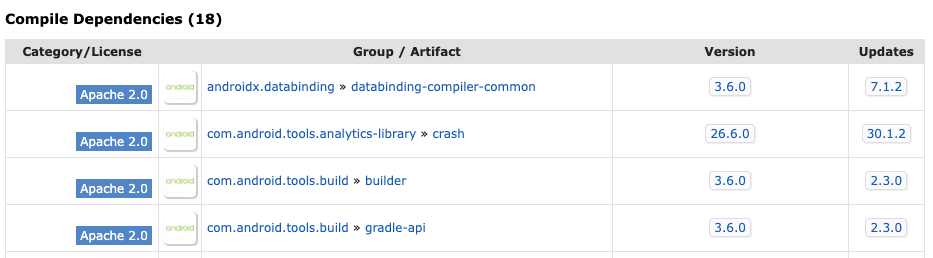
第一个就是 DB,同时查看这个东西的反向依赖也能发现其 compiler, 我们发现这是个注解处理器,会在编译时动态生成 class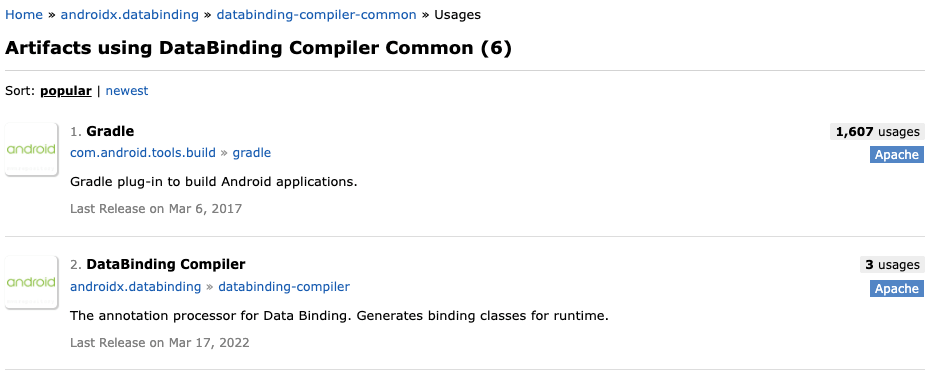
这些都是给编译器用的,如果要做到实时提示的话,要依赖 IDE 的支持,我们也可以找到与 AGP 搭配食用的 IDEA Android Plugin: [JetBrains/android: Android Plugin for IntelliJ IDEA (github.com)](https://github.com/JetBrains/android),不过项目是使用 Google 内部比较常用的 bazel 进行构建的,而不是 Gradle,这里我们可以对项目进行一些改造方便我们在 IDEA 中查看源码以及引用跳转,我这里有一份自己的改造:[zsqw123/DataBinding-IDEA-Plugin](https://github.com/zsqw123/DataBinding-IDEA-Plugin),可以直接在 IDEA 中打开和智能提示
## 2. IDE Plugin 分析
对于任何一个 IDEA Plugin,我们都可以在 META-INF 中找到插件配置 `.xml` 文件,在 DB 的 `.xml` 中,我筛选了几个 ViewBinding 主要用到的这些扩展,每一个扩展事实上都是定义了一个接口/抽象类,我们实现相应的扩展就是去实现指定的接口并在这里进行注册。
```xml
```
这几个扩展的大致流程是:
接下来我们就来说说这几个扩展的作用:
### shortNamesCache
用于 Code Completion,在输入非全类名时,提示出项目中的文件以及 Class,Method,Field 等,并进行 suggesting import
### resolveScopeEnlarger
虚拟生成的 class 存在于 Light VirtualFileSystem 中,并不是项目源码所在的位置,如果我们要让 IDE 找到这些虚拟生成的 class,我们就需要通过 `ResolveScopeEnlarger`和`KotlinResolveScopeEnlarger` 实现
### elementFinder
这个扩展可以实现按 qualifiedName 定位类或包,在 VB 中,`activity_main.xml` 将会找到其生成的类 `ActivityMainBinding`
### moduleService
针对 Module 注册的服务,在 VB 中,在 DB 中的这个 `LayoutBindingModuleCache` 中,通过 `getLightBindingClasses` 真正生成了 `LightBindingClass`
### 其他
- customUsageSearcher 用来找到 Usage 引用,在重构时方便找到关联的引用
- automaticRenamerFactory 用于重构,方便批量重命名引用
## 3. 参考
- [android light classes](./220318-android-plugin)
- [kotlin light classes](./220318-kotlin-plugin)